
Network Topology Types — Complete Study Notes with MCQs
Clear, exam-focused notes on network topology for SSC, Banking (IBPS/SBI), Railway, UPSC, NIELIT, JAIIB/CAIIB and other competitive exams. Learn definitions, types, advantages, disadvantages, formulas, real uses, and practice with interactive MCQs.
What is Network Topology?
Core definition asked in almost every computer awareness paper
Network topology is the arrangement of computers, cables, and network devices in a network. It describes how devices are connected and how data travels from one device to another.
Node
Any device on the network — PC, printer, server, router, switch.
Link / Cable
The communication path (wired or wireless) joining two nodes.
Topology types
Star, Bus, Ring, Mesh, Tree, Hybrid (+ point-to-point in WAN questions).
Types of Network Topology
Six topologies most frequently asked in competitive exams
1 Star
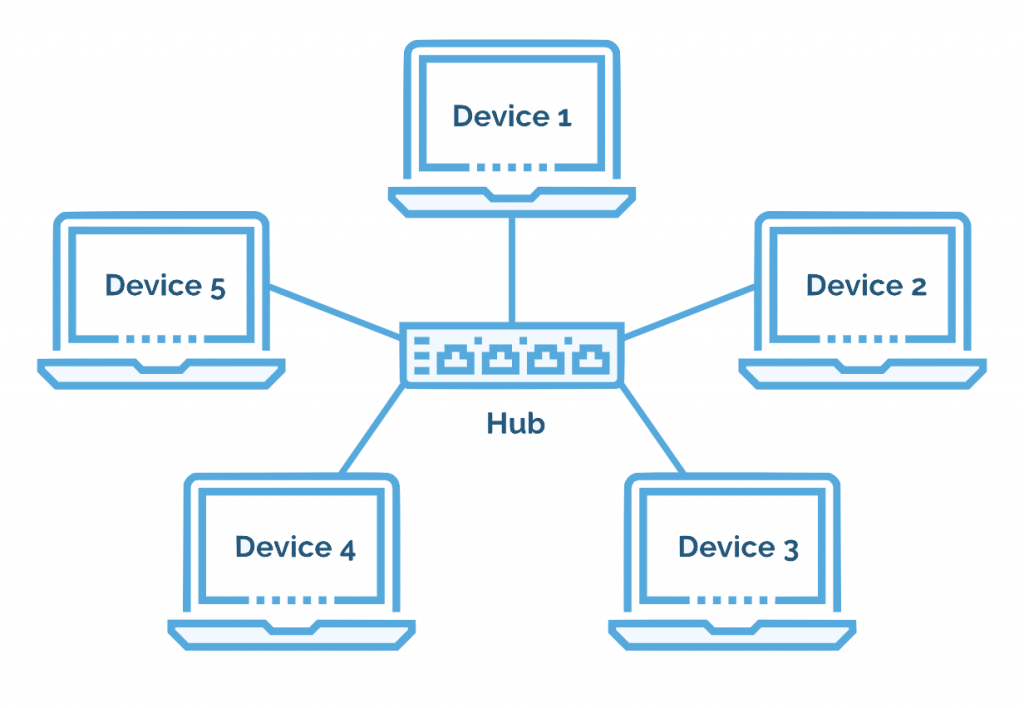
All devices → central hub/switch. Most common LAN design today.
2 Bus
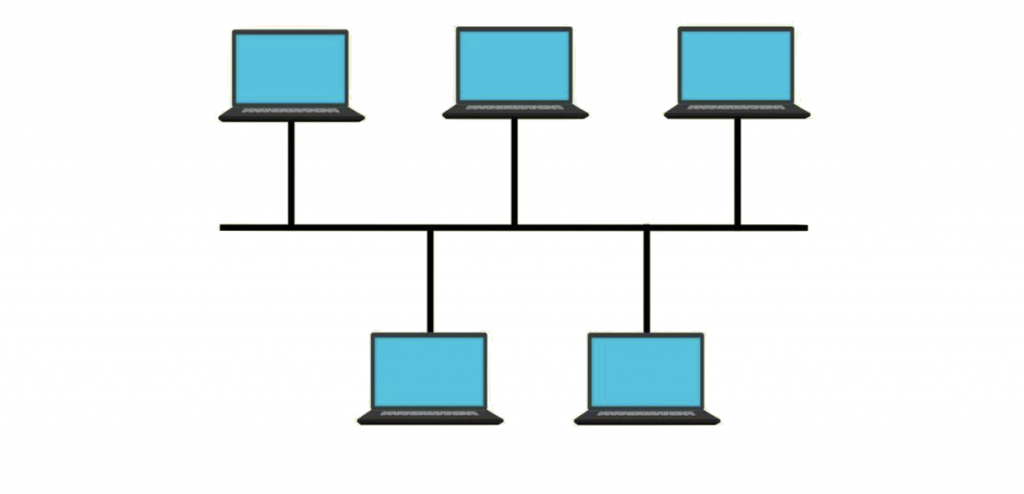
One shared backbone cable. Cheap, old Ethernet style.
3 Ring
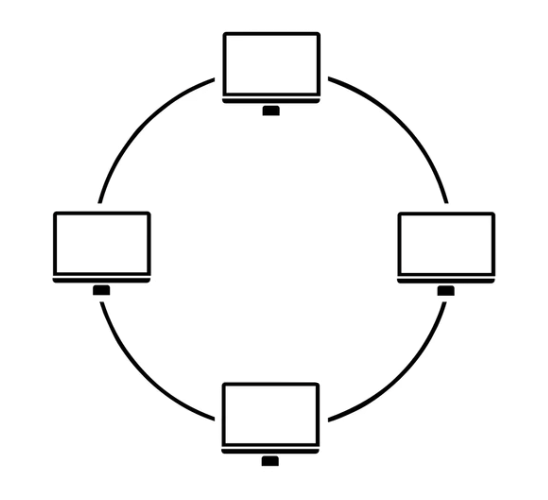
Devices in a loop; often token passing (Token Ring / FDDI).
4 Mesh
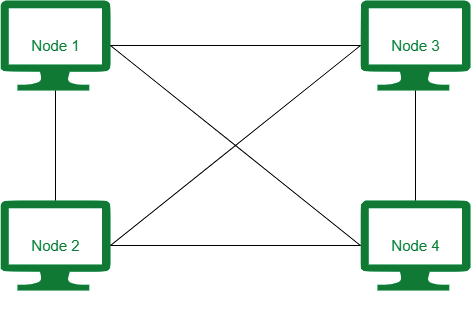
Many interconnections; highest reliability; costly.
5 Tree
Hierarchical star-of-stars / bus + star. Campus networks.
6 Hybrid
Mix of two or more topologies. Large enterprises.
1. Star Topology
Highest frequency topic in SSC & Banking computer awareness
In star topology, every device connects to a central hub or switch with its own cable. Devices do not connect directly to each other. Data usually goes device → centre → destination.
Advantages
- Easy to install, expand, and manage
- Failure of one end device/cable does not stop the whole network
- Easy fault finding (check the central device / one cable)
- With a switch, collisions are greatly reduced
Disadvantages
- Central hub/switch is a single point of failure
- Needs more cable than bus
- Depends on central device capacity
- Hub-based stars can still face congestion
Examples / Use
- Home Wi-Fi + LAN (AP/router at centre)
- Office Ethernet (PCs → switch)
- Telephone exchange / PBX model
Exam Hot Points
- Most widely used LAN topology today
- Modern Ethernet = physical star
- n devices ⇒ about n cables
- Centre fails ⇒ entire network fails
2. Bus Topology
Classic shared-medium design — terminators & collisions
In bus topology, all devices share a single backbone cable. Data is broadcast on the cable; the intended device accepts it. Both ends of the cable need a terminator to stop signal reflection.
Advantages
- Cheapest for small networks
- Least cable length
- Simple to understand
- Easy to connect a few devices
Disadvantages
- Backbone failure = full network failure
- Collisions on shared medium (CSMA/CD era)
- Hard to troubleshoot
- Poor scalability; performance drops with more nodes
Examples / Use
- Early Ethernet: 10BASE5, 10BASE2
- Small temporary lab setups (legacy)
Exam Hot Points
- Needs terminators
- Least expensive / least cable
- Original Ethernet topology = Bus
- Most collision-prone among basics
3. Ring Topology
Loop structure, token passing, FDDI dual ring
In ring topology, each device connects to exactly two neighbours, forming a closed loop. Data travels hop-by-hop around the ring. Many exam questions link rings with token passing (Token Ring, FDDI).
Advantages
- Orderly access with token — fewer collisions
- Fair chance for every station
- Predictable performance under light/moderate load
- Dual ring improves fault tolerance
Disadvantages
- Simple ring: one break can stop the network
- Adding/removing a node can disrupt the ring
- Delay increases as more nodes join
- Troubleshooting can be harder than star
Examples / Use
- IBM Token Ring (legacy LANs)
- FDDI dual fibre rings (campus/MAN backbone)
- Some metro (MAN) ring designs
Exam Hot Points
- Token used for communication
- n devices ⇒ n links
- Token Ring: physical star, logical ring
- FDDI = dual ring
4. Mesh Topology
Maximum reliability — full mesh formula is a favourite MCQ
In mesh topology, devices have multiple interconnections. In a full mesh, every device connects to every other device. In a partial mesh, only some important nodes have multiple links.
Advantages
- Highest fault tolerance & redundancy
- Multiple paths → reliable routing
- Privacy/security better on dedicated links
- Ideal for mission-critical & WAN cores
Disadvantages
- Most expensive (cables + ports)
- Complex installation & maintenance
- Impractical for large number of end PCs
- Configuration overhead
Examples / Use
- Internet / ISP backbone (partial mesh)
- WAN links between critical sites
- Military, banking core, data-centre fabrics (variants)
Exam Hot Points
- Full mesh links = n(n−1)/2
- Most reliable / most redundant
- Most costly & hardest to maintain
- WAN / Internet ≈ mesh
5. Tree Topology (Hierarchical)
Star-of-stars — campus and multi-storey networks
Tree topology is a hierarchical structure. Groups of star networks connect to higher-level hubs/switches, like branches of a tree. Many textbooks describe it as a combination of bus + star or expanded stars. It is also called hierarchical topology.
Advantages
- Scalable — easy to add branches
- Structured management (root → branches → leaves)
- Suitable for large organisations & campuses
- Point faults in a leaf rarely kill the whole tree
Disadvantages
- Root failure can affect large parts
- More cabling and hardware than simple star
- Design is more complex
- Maintenance needs planning by layers
Examples / Use
- University / college campuses
- Multi-floor office buildings
- Enterprise access–distribution–core idea
Exam Hot Points
- Hierarchical structure = Tree
- Combination of Bus + Star (common MCQ key)
- Root node failure is critical
- Used in corporate / university networks
6. Hybrid Topology
Real-world networks are rarely “pure” one type
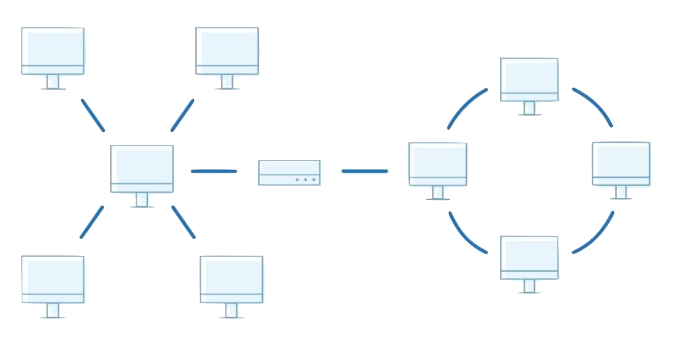
Hybrid topology combines two or more basic topologies (for example star-bus, star-ring, star access + mesh core). Designers pick strengths of each type — easy local star wiring plus resilient mesh/ring backbone.
Advantages
- Flexible and customisable
- Can optimise cost vs reliability
- Scales for large enterprises
- Matches real business needs
Disadvantages
- Complex design
- Higher cost than a single simple topology
- Needs skilled management
- Troubleshooting across mixed parts is harder
Examples / Use
- Banks, corporates, multi-branch offices
- Data centres + office floors
- WAN + LAN combined designs
Exam Hot Points
- Definition: combination of two or more topologies
- Used in large / enterprise networks
- Not the same as “bridge” (device ≠ topology)
+ Point-to-Point (often in WAN questions)
A point-to-point link connects exactly two nodes with a dedicated path (for example two routers on a leased line). It is the simplest topology building block. Many WAN links are point-to-point; a collection of such links can form partial mesh.
Comparison Chart (Quick Revision Table)
Use this table the night before the exam
| Topology | Structure | Fault Tolerance | Cost / Cable | Best For | Key Weakness |
|---|---|---|---|---|---|
| Star | All nodes → central hub/switch | Medium (centre critical) | Moderate cable | Home & office LAN | Hub/switch failure |
| Bus | Single shared backbone | Low | Lowest | Small / legacy Ethernet | Backbone break; collisions |
| Ring | Closed loop; often token | Low–Medium (dual ring better) | Moderate | Token Ring, FDDI, some MANs | Single break in simple ring |
| Mesh | Many / all-to-all links | Highest | Highest | WAN, Internet core, critical nets | Cost & complexity |
| Tree | Hierarchical branches | Medium | Higher than star | Campus, multi-building | Root failure |
| Hybrid | Mix of topologies | Depends on design | Usually high | Enterprises, banks | Complex design & management |
Important Formulas & Cable Counts
Direct numerical MCQs appear every year in IT papers
Number of duplex links for n nodes in full mesh. Example: n=6 → 15.
n end devices need n cables to the hub/switch (plus the central device).
Each node connects to next; last connects back to first → n links.
Ports in full mesh (each node)
Each device in an n-node full mesh needs (n − 1) ports/links. Total ports counting both ends = n(n − 1), which is why link count is half of that for duplex links.
Physical Topology vs Logical Topology
Short theory that clears 1–2 tricky MCQs
Physical Topology
Actual layout of cables, devices, and ports — what you see in the building.
- Example: all RJ-45 cables go to a switch in the rack → physical star
- Concerns installation, cost, cable length
Logical Topology
How data appears to flow — the communication path, not the wiring photo.
- Token Ring may be wired as star but works as logical ring
- Some shared media behave as logical bus
Where Each Topology Is Used (Exam Mapping)
| Network type | Common topology answer | Note for exams |
|---|---|---|
| LAN (modern office/home) | Star | Switched Ethernet |
| Early Ethernet LAN | Bus | Coaxial, terminators |
| WAN / Internet backbone | Mesh (often partial) | Redundant router links |
| MAN (city networks) | Ring (often) | Metro rings, dual paths |
| Campus / university | Tree / Hybrid | Hierarchical layers |
| Wi-Fi infrastructure mode | Star | Clients ↔ Access Point |
| Telephone network model | Star | Handsets ↔ exchange |
One-Glance Quick Revision
Memorise these lines — they map directly to MCQ options
Cheapest / least cable
Bus topology
Most costly / most reliable
Mesh topology
Central device failure kills net
Star (hub/switch) · Tree (root)
Needs terminator
Bus topology
Token passing
Ring (Token Ring / FDDI)
Full mesh links
n(n − 1)/2
Most used LAN today
Star topology
Bus + Star combination
Tree topology
Mix of topologies
Hybrid topology
Original Ethernet
Bus · Modern Ethernet → Star
Physical star, logical ring
Token Ring
Not a topology
Bridge, Router, Switch (these are devices)
Practice MCQs on Network Topology
Tap an option to reveal the correct answer and a short explanation. Answers stay hidden until you choose.
Exam Tips for Topology Questions
Read “fails” carefully
End-node failure vs central hub failure vs backbone failure point to different topologies. Underline the failed component in the question.
Devices are not topologies
Options like bridge, router, repeater, switch are devices. If asked “which is not a topology?”, pick the device.
Memorise one formula deeply
Full mesh L = n(n−1)/2 appears again and again. Practice n = 4,5,6,10 mentally.
Link protocol names
Ethernet history → Bus then Star. Token Ring / FDDI → Ring. Internet WAN → Mesh. Campus → Tree/Hybrid.
Physical vs logical
If both “star” and “ring” seem correct, check whether the question says physical layout or logical data path (Token Ring trick).
Cost vs reliability trade-off
Cheapest ≈ Bus. Most reliable ≈ Mesh. Most common LAN ≈ Star. “Best of both / large org” ≈ Hybrid or Tree.
Rank Math SEO Settings (for publishing)
Copy these into Rank Math when you publish this page. You can remove this box from the live page after copying, or keep it only in draft.
- Focus Keyphrase
- network topology
- Secondary Keywords
- types of network topology, network topology types, star topology, bus topology, ring topology, mesh topology, tree topology, hybrid topology, network topology MCQ, network topology for competitive exams
- SEO Title
- Network Topology Types with MCQs for Competitive Exams | GyanDesk
- Meta Description
- Learn network topology types — star, bus, ring, mesh, tree & hybrid — with comparison tables, formulas and 60 MCQs for SSC, Banking, Railway and other competitive exams.
- URL Slug (keep existing if already ranked)
- topologies · suggested richer slug if new:
network-topology - Rank Math extra tips
-
• Use focus keyphrase in first paragraph, at least one H2, and image ALT text.
• Set article type: Article / Study Notes.
• Add internal links to other IT notes on GyanDesk.
• OG title: same as SEO title · OG description: same as meta description.
• Schema: Article + FAQ (optional FAQ on “What is network topology?”, “Which topology is most reliable?”).
• Breadcrumbs: Home → Information Technology → Network Topology
Related notes
More free study notes in Information Technology — all part of the GyanDesk study library.